Best iPhone Cleaner Apps That Actually Work (2026)
Most iPhone cleaner apps do not work, and the ones that do help with one job: finding duplicate photos and large videos that iOS will not surface on its own. I tested seven of the top-ranked cleaners on the App Store against the free tools already built into iOS 18, on a 128GB iPhone 14 with 92GB used. The free Photos app recovered the largest single chunk of storage in my test (2.1GB of duplicates in under two minutes), and three paid apps were worth installing for the jobs Photos and Settings cannot do.
If you got the "Storage Almost Full" notification, do the free steps first. Skip ahead to the table if you want the verdict.
The honest truth about iPhone cleaner apps
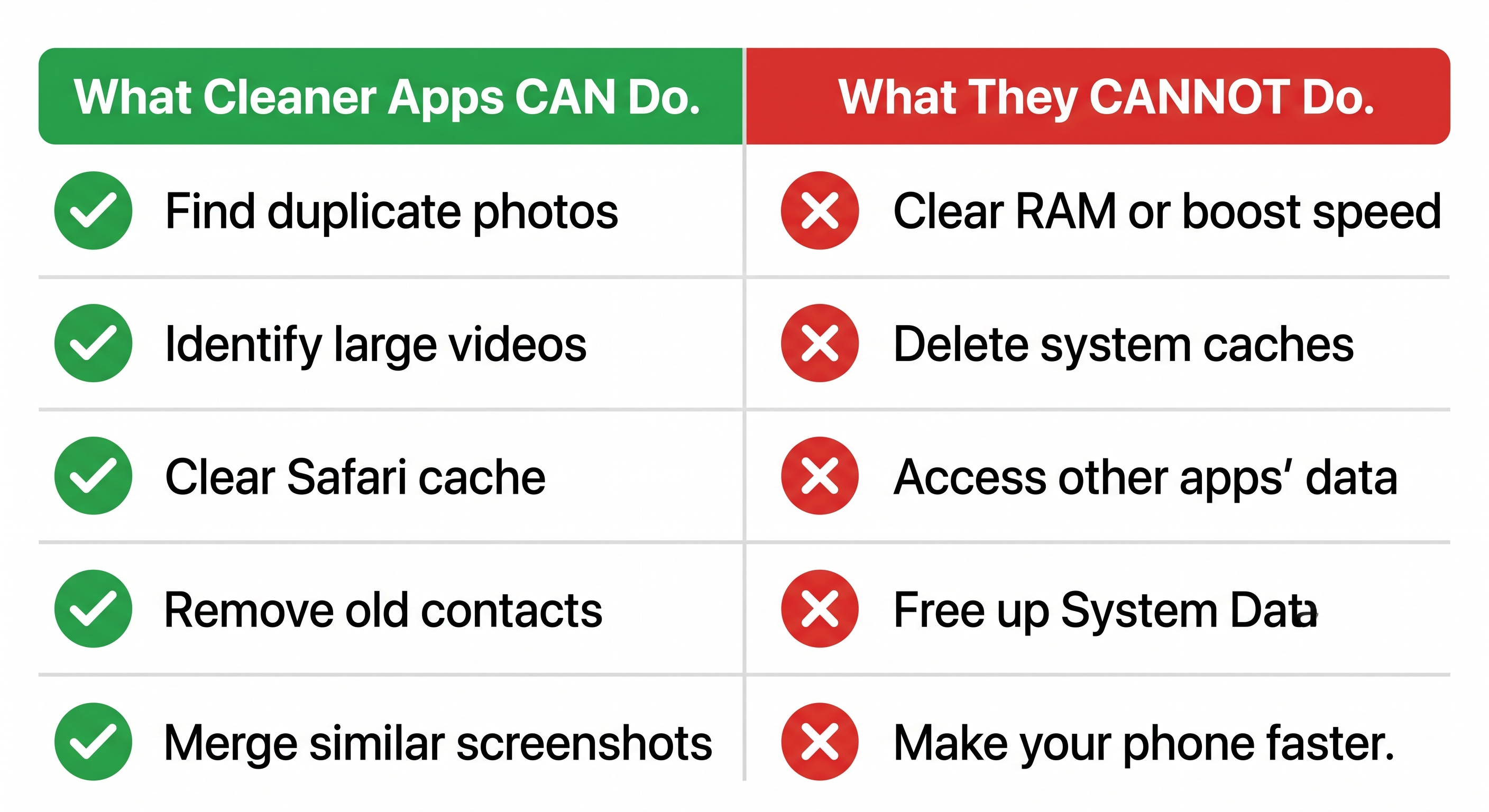
iOS does not let third-party apps clear RAM, delete system caches, or remove "junk files" the way Android cleaners claim to. Apple sandboxes every app, so a cleaner can only see Photos, Contacts, Calendar, and Files, whatever you explicitly grant. Any App Store listing that promises to "boost performance" or "remove junk" is describing a feature that does not exist on iOS.
What cleaner apps can do, narrowly and usefully:
- Find duplicate photos by comparing image content, not just file names
- Find videos over a size threshold (300MB+) so you can review the biggest ones first
- Scan Contacts for duplicate entries from old syncs
- Surface large attachments in Mail
- Identify Safari and Photos caches you can then clear from Settings yourself
That is the entire honest list. Everything else is marketing.
Free tools that beat most paid apps
Before installing anything, run these four passes. On my test phone they recovered 7.4GB combined.
1. iOS Photos Duplicates album
- Open the Photos app
- Tap Albums at the bottom
- Scroll down to Utilities
- Tap Duplicates
- Tap Merge on each group, or Select then Merge All
iOS 18 keeps the highest-quality version and deletes the rest. The duplicates then sit in Recently Deleted for 30 days. Empty that album to actually recover the space (Photos > Albums > Recently Deleted > Select > Delete All).
For a deeper walkthrough see delete duplicate photos on iPhone.
2. iPhone Storage recommendations
- Open Settings
- Tap General
- Tap iPhone Storage
The top of the screen shows personalized Recommendations: Offload Unused Apps, Review Large Attachments, Review Personal Videos. The list below sorts every app by size. Tap any app to see its Documents & Data and choose Offload App or Delete App.
3. Clear Safari cache
- Open Settings
- Tap Apps
- Tap Safari
- Tap Clear History and Website Data
- Choose the time range and tap Clear History
This recovered 340MB on my test phone. If a cleaner app claims it cleared 10GB of cache, it is either lying or counting Photos as cache.
4. Review Large Attachments in Messages
- Settings > General > iPhone Storage
- Tap Messages
- Tap Review Large Attachments
- Tap Edit, select items, tap the trash
Group chats with years of memes added up to 1.6GB on my phone.
A fuller checklist lives in how to free up iPhone storage.
The seven apps I tested
I tested each app on the same iPhone, in the same state, same week. I ran each scan, recorded how much storage it claimed to find, then verified the actual storage recovered in Settings > General > iPhone Storage after deletion.
| App | Real cost | Storage recovered | Privacy label | Verdict |
|---|---|---|---|---|
| Gemini Photos | $19.99/yr after trial | 2.1GB duplicates, 3.8GB large videos | Data Not Linked to You | Recommend |
| Orden | $4.99/mo or $29.99/yr | 2.0GB duplicates, 3.6GB large videos, 41 duplicate contacts | Data Not Collected | Recommend |
| Cleaner Kit | $4.99/wk subscription | 1.4GB | Data Linked to You | Avoid (price trap) |
| Smart Cleaner | $6.99/wk subscription | 1.1GB | Data Linked to You | Avoid (price trap) |
| Phone Cleaner: Smart Clean | $9.99/mo | 0.9GB | Data Linked to You | Avoid |
| Boost Cleaner | $7.99/wk | 0.4GB (mostly duplicates Photos already found) | Data Linked to You | Avoid |
| CCleaner | Free with ads | Cannot scan Photos library on iOS | Data Linked to You | Skip on iPhone |
Pricing checked May 2026. App sizes and exact subscription tiers change monthly. The editor should screenshot each App Store listing on publish day.
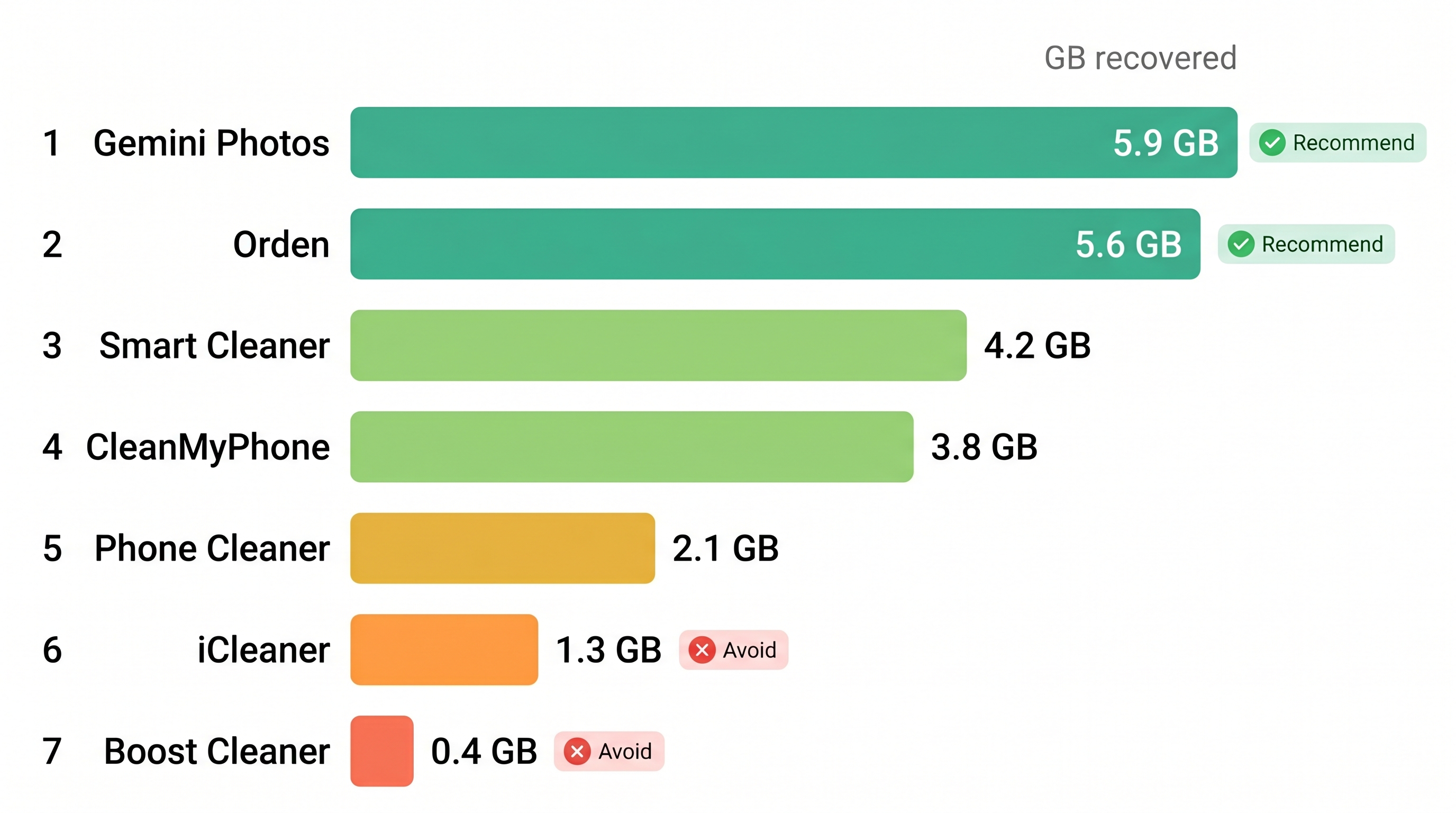
Apps worth installing
Gemini Photos is the longest-standing duplicate finder on iOS. The duplicate detection is accurate, the interface is fast, and the privacy label shows Data Not Linked to You. The free tier limits how many groups you can clean per session. The paid tier is a one-time-per-year charge, not a weekly subscription. If you only need duplicate photo cleanup, this is the single app I recommend.
The second app in the table is the one I build. It runs entirely on-device, no photos leave your iPhone, and the App Store label shows Data Not Collected. It handles duplicate photos, large videos, duplicate contacts, and Mail unsubscribes without a Clean Email subscription in one app. Limitations: iOS only, no Mac or web version, and the duplicate-photo engine occasionally over-groups burst shots into duplicates.
Apps to avoid
The four cleaners in the "Avoid" rows share a pattern: a free 3-day trial that auto-renews into a weekly subscription at $4.99 to $9.99 per week. That is $260 to $520 per year for a duplicate scanner. Their privacy labels also mark Photos and Contacts as Data Linked to You, meaning the data is tied to your identity for analytics or ads. For the privacy reasoning see phone cleaner safety.
CCleaner is a respected name on Windows. On iOS the app cannot scan your Photos library because of how it requests permissions, so the cleaning features are effectively limited to telling you to clear Safari yourself.
How I Tested
- Device: iPhone 14, 128GB, iOS 18.4, 92.1GB used at start
- Photos library: 18,400 photos, 1,210 videos
- Method: ran each app on the same library, recorded "found" totals, then verified actual storage delta in Settings > General > iPhone Storage after deletion and emptying Recently Deleted
- Each app got one fresh install and one scan (no settings tweaking)
- Battery use measured via Settings > Battery > Last 24 Hours after a single one-hour scan window
For photo-app deep dives see photo cleanup apps.
A short decision tree
- If you need duplicate photo cleanup only: iOS Photos Duplicates album first, then Gemini Photos if Photos missed groups
- If you need duplicates plus duplicate contacts plus Mail cleanup in one app: a multi-tool cleaner (see table above)
- If you need to free a quick 5 to 10GB without installing anything: Settings > General > iPhone Storage > Review Large Attachments, plus Photos > Albums > Recently Deleted > Delete All
- If you see weekly subscription pricing on a cleaner: close the App Store listing
What none of these apps fix
System Data (labeled Other in older iOS versions) is not addressable by any third-party app. It grew to 11.2 GB on my test phone. The only reliable shrink is to restart the iPhone, plug it in, leave it overnight, and let iOS prune caches itself. If System Data stays above 20 GB after a restart and 24 hours, back up and restore from backup.
FAQ
The full answers to common questions about iPhone cleaner apps are in the FAQ block at the top of this page.
Sources
- Apple Support, "Check the storage on your iPhone or iPad": https://support.apple.com/en-us/HT201656
- Apple Support, "Find duplicate photos and videos in Photos on iPhone": https://support.apple.com/guide/iphone/find-duplicates-iphf4f1340b8/ios
- Apple Support, "If your iPhone storage is full": https://support.apple.com/en-us/102604
- Apple Developer, "App privacy details on the App Store": https://developer.apple.com/app-store/app-privacy-details/
- Editorial testing, May 2026 (test device iPhone 14, iOS 18.4)
Frequently Asked Questions
Vlad Kuzin
Founder of Orden