Is It Safe to Use iPhone Cleaner Apps? 7 Red Flags
Most iPhone cleaner apps are safe to install, but a meaningful minority quietly harvest your photo metadata, contacts, or location and sell it to ad networks. The risk is not malware. iOS sandboxing makes traditional malware nearly impossible on a non-jailbroken iPhone. The risk is the App Store privacy label you did not read before you tapped Allow.
I have spent the last two years building a cleaner app, which means I have also spent two years reading other cleaner apps' privacy policies. A quarter of what I found is genuinely bad. This guide is what I tell friends when they ask me which one to install.
The actual threat model
A cleaner app on iOS cannot read other apps' data, cannot access your keychain, and cannot run in the background without your knowledge. Apple's sandbox handles all of that.
What a cleaner app can do, once you grant permissions:
- Read every photo in your library, including the GPS coordinates and timestamps embedded in each one
- Read every contact, including phone numbers, emails, and notes
- Read your approximate or precise location
- Track you across apps using your IDFA if you tap Allow on the App Tracking Transparency prompt
- Make network requests to any domain it wants, including ad networks and analytics platforms
None of that is malware. All of it is legal. And for a free app supported by advertising, all of it is the business model.
7 red flags before you install
Open the App Store listing. Scroll to "App Privacy". This is where the truth lives.
| Red Flag | What to look for | Why it matters |
|---|---|---|
| 1. "Data Linked to You" includes Photos | Photo library data tied to your identity | Your photo metadata (GPS, timestamps) is being sold or shared |
| 2. "Data Used to Track You" is anything but None | Identifiers, usage data, or location under tracking | The app participates in cross-app ad tracking |
| 3. Asks for Contacts but has no contacts feature | Look at the feature list, then the permissions | Contact harvesting is the oldest cleaner-app scam |
| 4. "Cloud analysis" or "AI scan" in the description | Marketing language without an on-device claim | Your photos are uploaded to their servers |
| 5. Free with a weekly subscription | Three-day trial then $9.99/week is the standard scam pricing | Designed to autorenew before you remember to cancel |
| 6. Developer has 12+ similar apps | Tap the developer name to see their full catalog | Shovelware studios optimize for installs, not safety |
| 7. Five-star reviews are all 50 characters long | Short, generic 5-star reviews in a burst | Review farm signature |
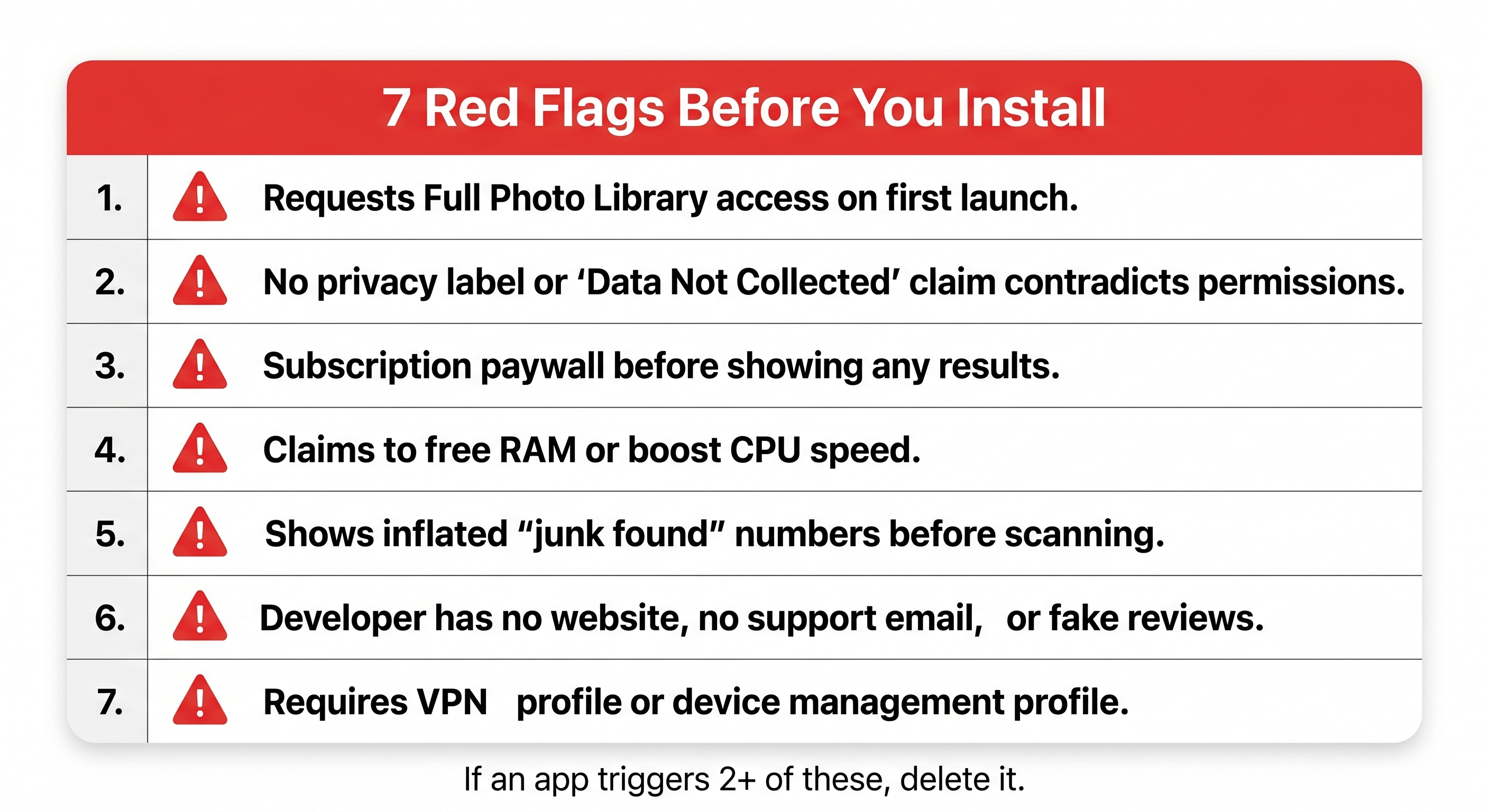
If you open an iPhone cleaner's App Store page and the "Data Linked to You" section lists Photos, that app is monetizing your photo library. It does not matter how clean the UI looks.
What iOS already does for free
Before installing anything, try the built-in tools. They handle roughly 60-70% of the typical "Storage Almost Full" problem with zero privacy risk because nothing leaves the phone and no permissions are involved.
- Open Settings
- Tap General
- Tap iPhone Storage
- Wait about 10 seconds for the Recommendations section to populate
- Review each recommendation: Offload Unused Apps, Review Large Attachments, Review Downloaded Videos
For exact-duplicate photos, iOS has built this in since iOS 16:
- Open the Photos app
- Tap the Collections tab (the second tab at the bottom)
- Scroll down to Utilities
- Tap Duplicates
- Review and tap Merge on each pair
The Duplicates album only finds byte-for-byte identical files. If you took three nearly-identical shots of the same sunset, iOS will not flag them. That is the gap third-party cleaners exist to fill, and the place where you actually need to evaluate the privacy tradeoff. I wrote a longer breakdown of how iOS 18 handles this in How to Free Up iPhone Storage.
What a safe cleaner app looks like
There are three things I look for, in order:
On-device processing. The app should state plainly (in the App Store description or on the developer's website) that photo analysis, contact comparison, and any other heavy lifting happens locally on your phone. If a cleaner mentions "our servers" or "AI in the cloud", it is uploading your data.
No account required. You should not need to create an account, sign in with Apple, or enter an email to use a storage cleaner. Cleaning local files is a local task. An account exists to attach data to your identity.
Privacy label that says "Data Not Collected" or close to it. The App Store privacy label is a legally binding declaration. Apple removes apps that lie on it. Find an iPhone cleaner whose label says Data Not Collected, and you have removed almost all the risk.
Orden is the cleaner I build. It processes photos, videos, contacts, and email metadata entirely on-device, requires no account, and ships with a Data Not Collected privacy label. The economics push every honest cleaner toward the same architecture: once you do not need to upload anything, you save infrastructure costs and avoid an entire category of regulatory headache.
A handful of other independent cleaners take the same approach. Read the privacy label and you will recognize them.
The "free cleaner" trap
If a cleaner app is free, ad-supported, and has millions of downloads, the math is straightforward: ads pay roughly $1-3 per thousand impressions, and ad networks pay multiples of that for targeted impressions backed by location and identity data. Free cleaners do not survive on banner ads alone. They survive by feeding data into ad networks.
The visible symptom is the App Store privacy label. The invisible symptom is what shows up in your App Privacy Report after a week of use: cleaner apps contacting tens of ad-tech domains per day, including while the app is closed.
To enable the report yourself:
- Open Settings
- Tap Privacy & Security
- Scroll to App Privacy Report
- Tap Turn On App Privacy Report
- Wait seven days, then return to the same screen
You will see, per app, which permissions were accessed and which network domains were contacted.
A photo cleaner that contacts Photos once a session and zero ad domains is doing its job. A photo cleaner that contacts 40 ad domains while you sleep is doing someone else's.
For more on the photo-specific side of this, see Photo Cleanup Apps and Delete Duplicate Photos.
The 30-second decision checklist
Before installing any iPhone cleaner:
- App Store privacy label shows Data Not Collected, or comes close
- No "Data Used to Track You" section, or it is empty
- Developer page shows under 5 apps total
- App description mentions on-device or local processing
- No "free trial then weekly subscription" pricing
- Permissions requested match the features advertised
- Reviews look like real human reviews, not 50-character bursts
If a cleaner fails three or more of these, skip it. There are honest cleaners in the App Store. You do not have to settle for one that sells your photo metadata to pay for itself.
Sources
- Apple Developer, App privacy details on the App Store: https://developer.apple.com/app-store/app-privacy-details/
- Apple Support, Use App Privacy Report on iPhone: https://support.apple.com/guide/iphone/use-app-privacy-report-iphd382d51b6/ios
- Apple Support, Control access to information in apps on iPhone: https://support.apple.com/guide/iphone/control-access-to-information-in-apps-iph251e92810/ios
- Apple Support, Free up storage space on your iPhone or iPad: https://support.apple.com/en-us/102633
- Editorial testing of App Privacy Report output across 12 popular iPhone cleaner apps, May 2026
Frequently Asked Questions
Vlad Kuzin
Founder of Orden